
The Looker connector allows you to integrate Looker Explores, Looks, and Dashboards into the platform using API credentials. Once connected, these visualizations can be surfaced as assets that are fully embedded and viewable directly within the platform.
Looker Prerequisites
Before setting up the connector on the platform, you must generate API credentials in Looker. You will need:
-
Base URL (your Looker instance URL)
-
Client ID
-
Client Secret
To obtain these:
-
In Looker, navigate to Admin → Users.
-
Select the service account or user you want to use for API access.
-
Go to API Keys.
-
Generate a Client ID and Client Secret.
-
Confirm the user has access to the relevant folders, Looks, or Dashboards you want to expose.
Make sure this account has the appropriate permissions in Looker. Without access to the underlying content, the connector will not be able to retrieve objects and asset creation will be blocked.
Creating a Looker Connector
To set up a Looker connector:
-
Navigate to Connectors in the navigation bar.
-
Select Add Connector and choose Looker as the connector type.
-
Enter the required details:
-
Base URL
-
Client ID
-
Client Secret
-
-
Save the connector.
-
The platform will automatically run a connection test to validate the credentials.
If validation fails, check the API keys and Looker permissions
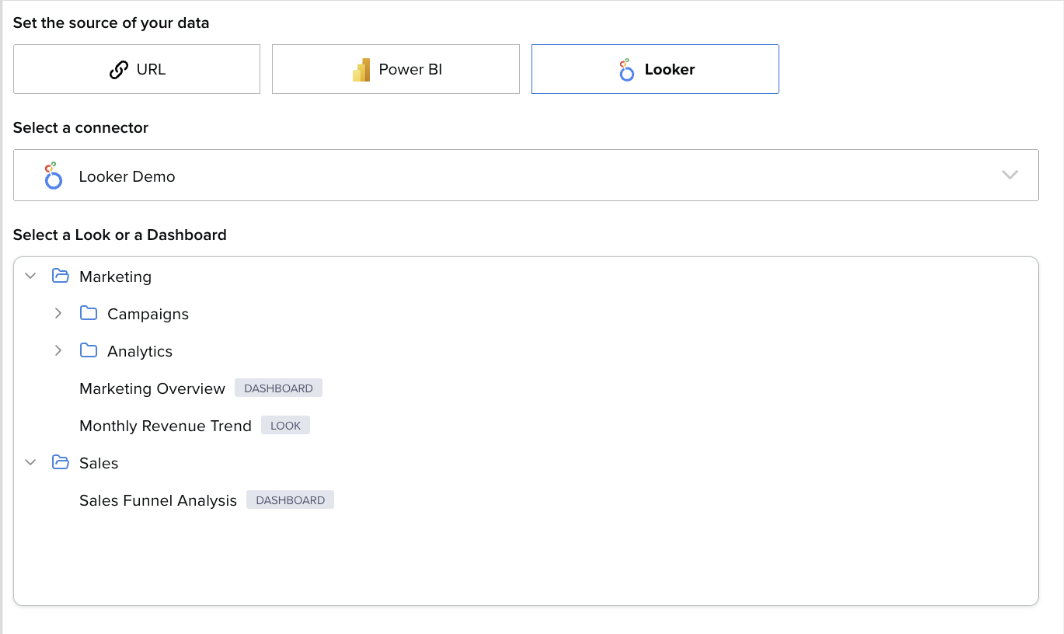
Creating a Looker Asset
To create a Visualization asset using Looker:
-
Select Visualization as the asset type.
-
Choose Looker as the source.
-
Select the relevant:
-
Looker Connector
-
Folder or Space (as applicable)
-
Look, Explore, or Dashboard
-
-
Complete the remaining steps to configure and release the asset.
Once released, the asset can be:
-
Shared directly with other users
-
Added to a data product
Note: Users only need the Access entitlement to view a Visualization asset or a data product containing one.
Once a user has Access:
-
Navigate to My Collection or the relevant data product in the Exchange.
-
Select the asset.
-
The Looker visualization will open in a new tab, fully embedded and interactive.
No Looker license is required to view embedded content through the connector.
No Looker license is required to view the embedded content.