
What is Product Search?
Data consumers can use Product Search alongside the platform’s categories, tags and filtering functionality, to more quickly and seamlessly discover data.
Without needing knowledge of the exact product name, users can enter use full or partial queries, to search for attributes and metadata that available for products and assets visible to them.
The functionality can be used in one of two ways:
Option A: Via Homepage (if enabled on your Homepage by a Platform Admin)
-
Navigate to your Organization’s Homepage.
-
Click inside of the search bar that is located in the middle of the Homepage.
or
Option B: Via The Exchange
-
Navigate to The Exchange.
-
Click in the search bar below the “Browse data products” heading.
For context on how the functionality and matching occurs, see the technical guidance located here: Homepages
How to Use Product Search
-
Begin to type your search terms.
As you type, you will see the results will update below based on the indexed metadata. The search will return ranked results that will always resolve to products, even when matching occurs at the asset or metadata level.
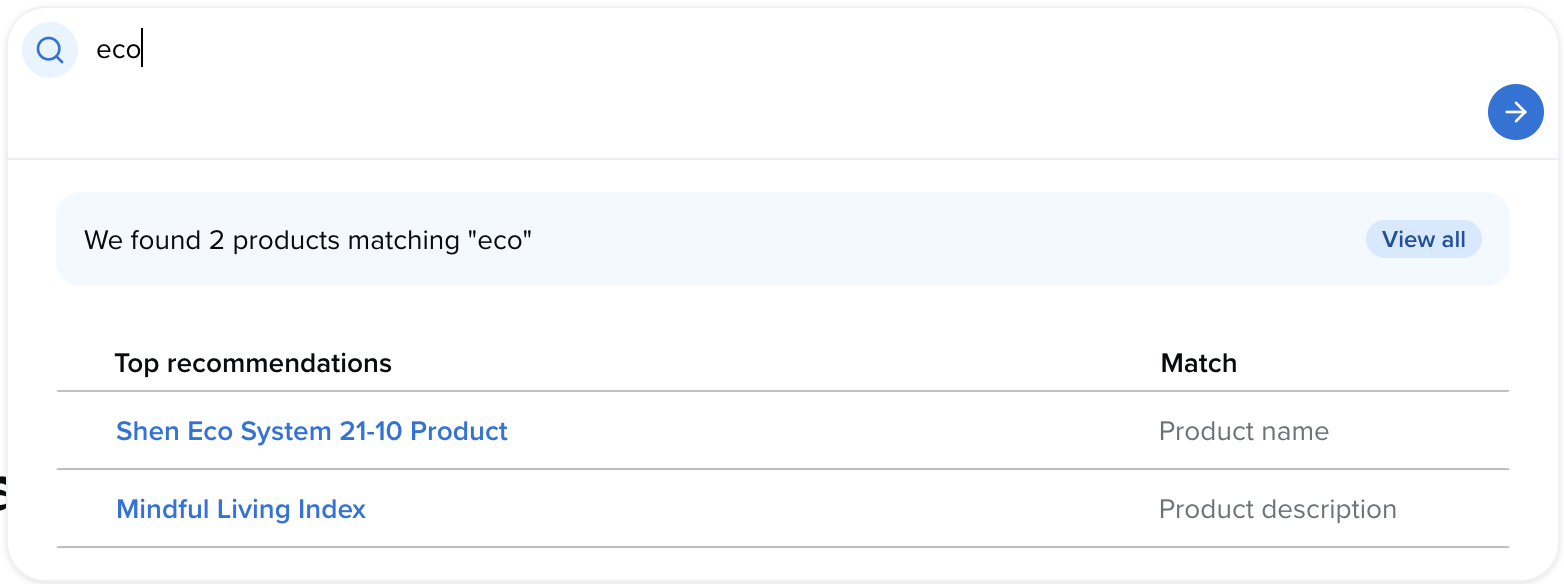
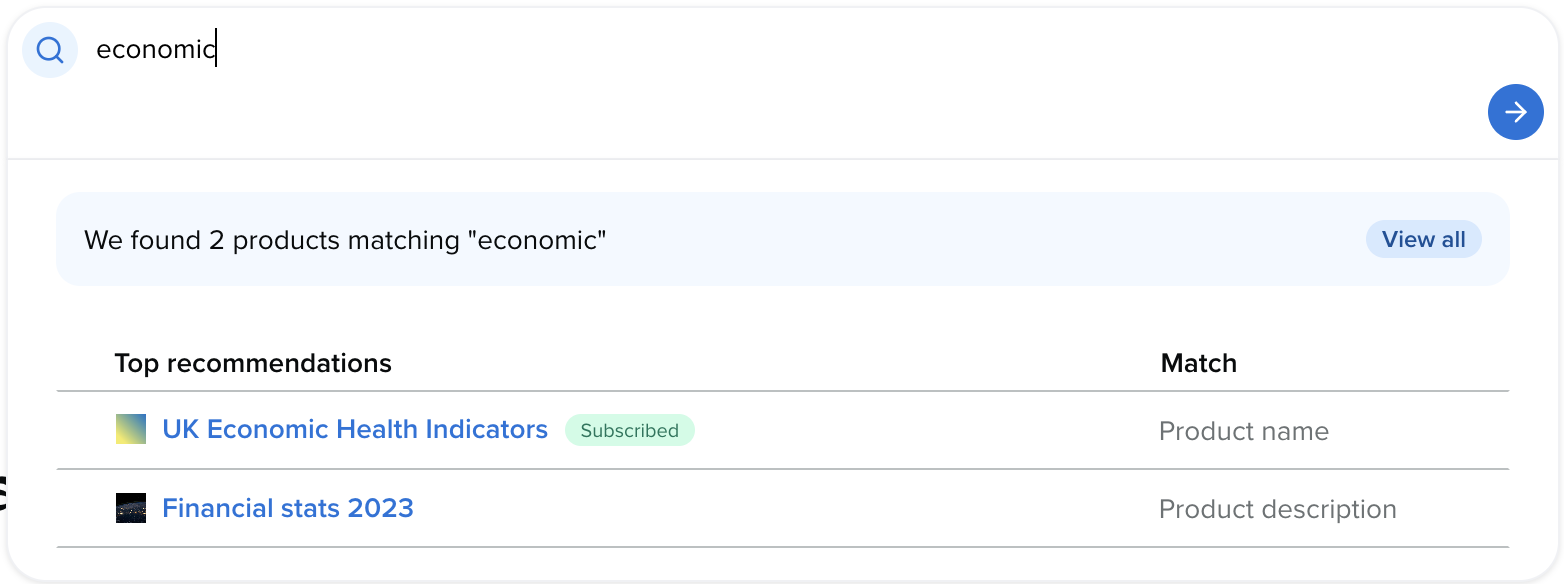
-
Once you see a data product that looks appropriate to your use case and intent, click on it to be redirected to the Product page.
-
From here, you can assess the Product’s relevance using the description, metadata, sample and dictionary attributes before subscribing.
If the current product is not deemed suitable, return to Product Search to browse additional options available to you. Happy searching!
How Search Terms are Ranked
Ordering is based on a scoring system based on :
Most accurate to least accurate match to user’s input:
-
Whole phrase
-
Partial phrase
-
Partial word
Importance weighting based ordering as follows:
-
Product name
-
Product description
-
Product headline
-
Asset name
-
Asset description
-
Product metadata
-
Column name
-
Column description
-
Product ID
-
Asset ID
Best Practice
To maximize discoverability through Product Search, Producers should:
-
Use clear, descriptive product titles: Avoid internal naming conventions or abbreviations that may not align with consumer search intent.
-
Write concise, value-focused descriptions: Descriptions should clearly state what the product contains and the problems it helps solve.
-
Apply accurate categories and tags: Categories and tags remain important signals for both filtering and search relevance.
-
Maintain consistent terminology: Use language that reflects how consumers are likely to search for the data, rather than how it is described internally.
-
Keep metadata up to date: Regularly reviewing and updating product metadata improves ongoing search relevance.
What is Intelligent Search?
While Product Search is excellent for finding specific datasets when you know exactly what you are looking for, Intelligent Search offers a more advanced, conversational approach to navigating the Harbr Marketplace. It uses AI to bridge the gap between your natural terminology and technical product metadata.
AI-Powered Discovery transforms the search experience from a simple keyword-matching exercise into a collaborative dialogue. It provides several key advantages:
Recognizes Your Intent
Traditional search relies on exact or fuzzy string matching. AI-Powered Discovery understands the intent and context behind your query:
-
Synonym & Acronym Recognition: The system understands industry-specific jargon (e.g., recognizing that "Forex" means "Foreign Exchange").
-
Concept Mapping: It recognizes related concepts. A search for "sustainability" will surface products related to "ESG" or "carbon footprints" even if the specific word "sustainability" is missing from the title.
-
Speak your Language: The AI can bridge gaps between different regional terminologies, professional dialects within your organization.
Solve Business Problems
Rather than matching a single word, the system identifies products that align with specific business outcomes. This allows for high-level data product discovery and gives the consumer the ability to build a set of data products that lead to a positive business outcome rather than finding a single product that matches a keyword.
Iterative Refinement
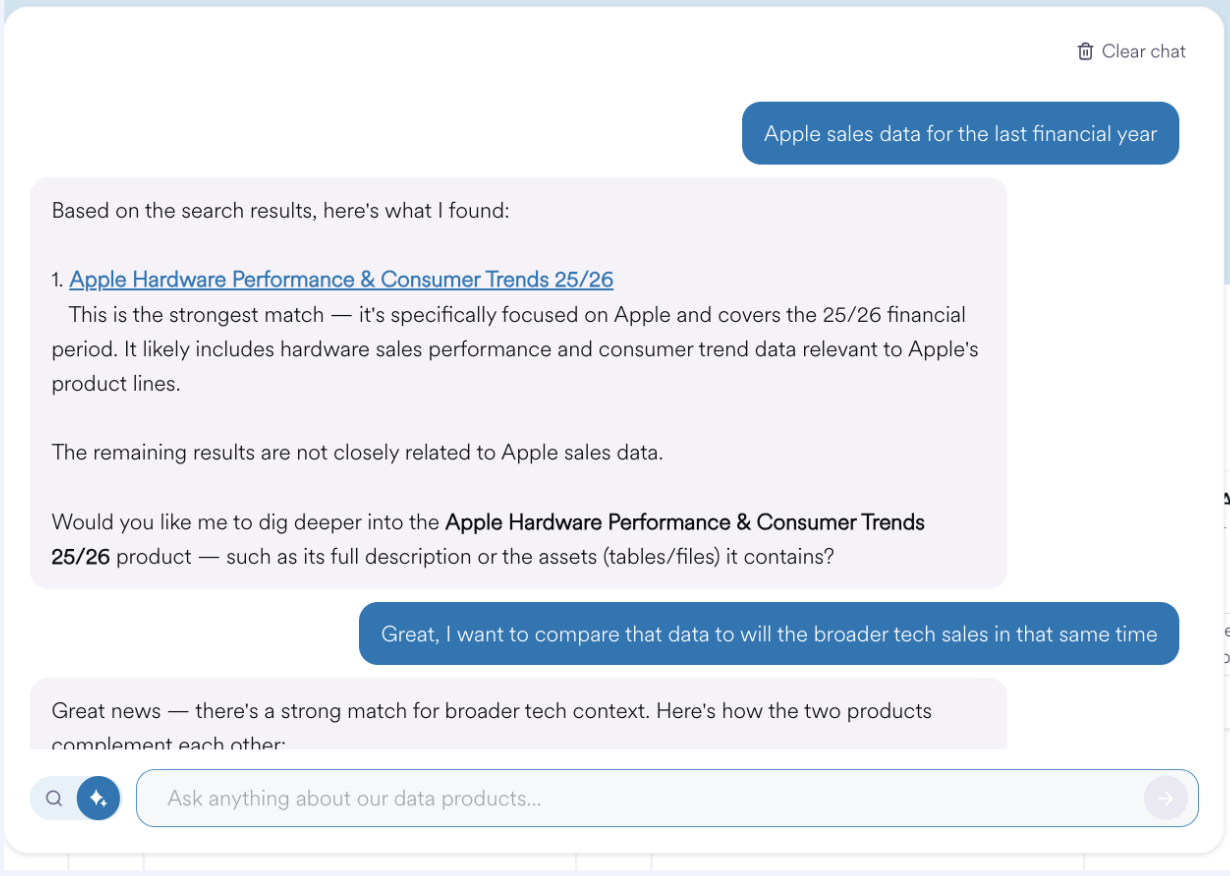
You can "talk" to the catalog using a chat format. If initial results are too broad, you can follow up with prompts to refine or add additional criteria to filter the previous results without starting a new search.
If products that match the criteria are found, they will be linked and are able to be opened in a new tab. There is no chat history between sessions, and content can be searched for in multiple languages.
To enable this feature will require the configuration of a selected Foundational Model as a Model Serving Endpoint within your Databricks Workspace. Please note that model availability varies by region.
If your preferred model is not available in your deployment region cross-regional data processing will need to be enabled, or a custom model endpoint defined referencing a localised service (E.g. AzureOpenAI) if jurisdictional enforcement is required.
Please contact your Harbr Account Manager to discuss further.
How to Use Intelligent Search?
-
Navigate to the Homepage: Start at the central search interface on your platform’s homepage.
-
Toggle Discovery Mode: In the search bar, use the UI control to switch from Product Search to AI-Powered Discovery. The interface will change to a chat-like prompt.

-
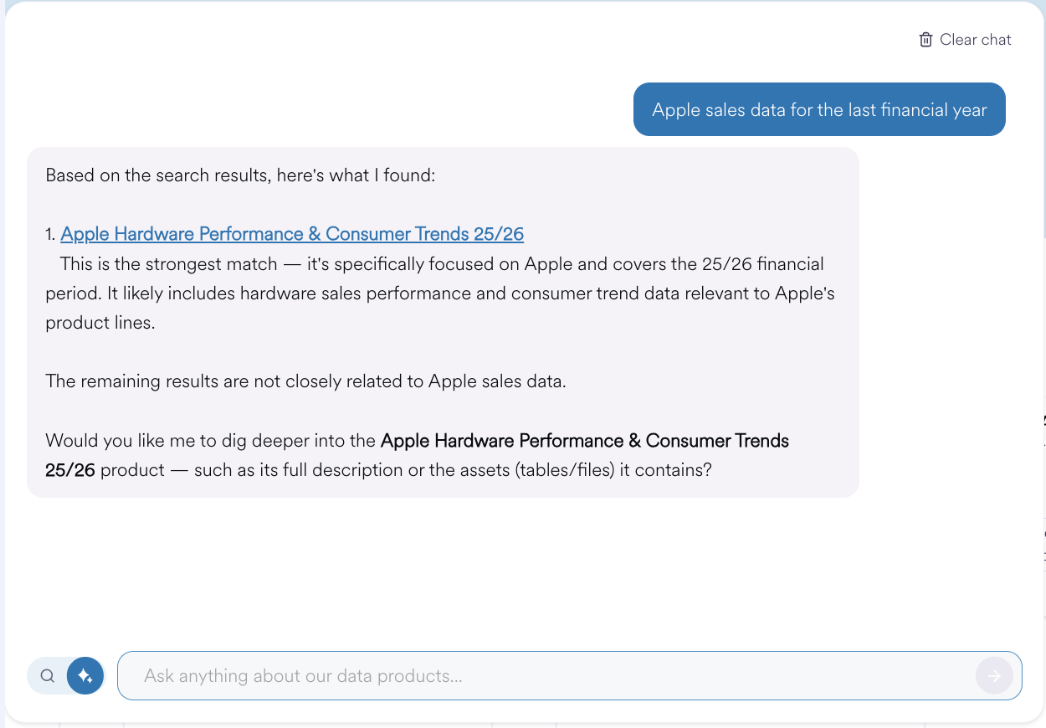
Describe Your Objective: Enter your goal or question in natural language (e.g., “Apple sales data for the last financial year”)
-
Review Results: The system will return a list of relevant products with names, clickable links, and an explanation of why each product was selected.
-
Refine Your Search: Use follow-up questions to narrow down the list or add new criteria to find additional products the compliment the ones you have already found.
Administrative Controls & Cost Management
To ensure the tool remains cost-effective and performant, Harbr provides granular administrative controls and fiscal guardrails:
-
Rate Limiting: Administrators can set a minimum time between prompts (e.g., 30 seconds) to prevent a flooding of different prompts.
-
Hierarchical Token Limits: Consumption can be limited at three levels:
-
User Level: Limits individual consumption.
-
Organization Level: Prevents one Organization from exhausting the shared token budget.
-
Ecosystem Level: Sets a global hard ceiling for the entire platform.
-
-
Intelligent Reset Windows: Admins can customize when token quotas refresh to align with business hours or specific time zones.
Note: Only an Ecosystem Admin has the permissions required to modify these settings within the platform metadata.