
Email Notifications
The Harbr Email Notifications Agent provides users with an "end-to-end view" of platform activities, ensuring they remain connected to the latest information in real-time. By keeping users informed through high-quality, branded designs, you can drive platform engagement, build trust in system reliability, and improve retention rates.
Real-Time Engagement: By keeping users informed in real-time, these updates drive platform engagement and bolster retention rates.
Platform Trust: Increased awareness of events, such as User Registered or Product Released, builds immediate trust in the platform's reliability.
Custom Branding: By customizing the templates with your branding allows for high-quality, engaging designs that reflect your platform's unique value.
Enriched Data: Providing an "end-to-end view" of activities gives users confidence they are always connected to the latest information.
Event Triggers
Custom notifications can be mapped to a wide array of platform events. Some of the most useful triggers include:
Subscriptions: Subscription Requested, Subscription Assigned.
Products & Assets: Product Released, Asset Created.
System Activity: Export Completed, Export Failed, User Registered.
For a full list of available events, please consult the Harbr Activity Log.
Solution Architecture
This diagram is designed to give you an overview of how the Harbr Notifications Agent integration comes together - from defining API endpoints, to registering event triggers, to running custom logic and deploying a production-ready service.
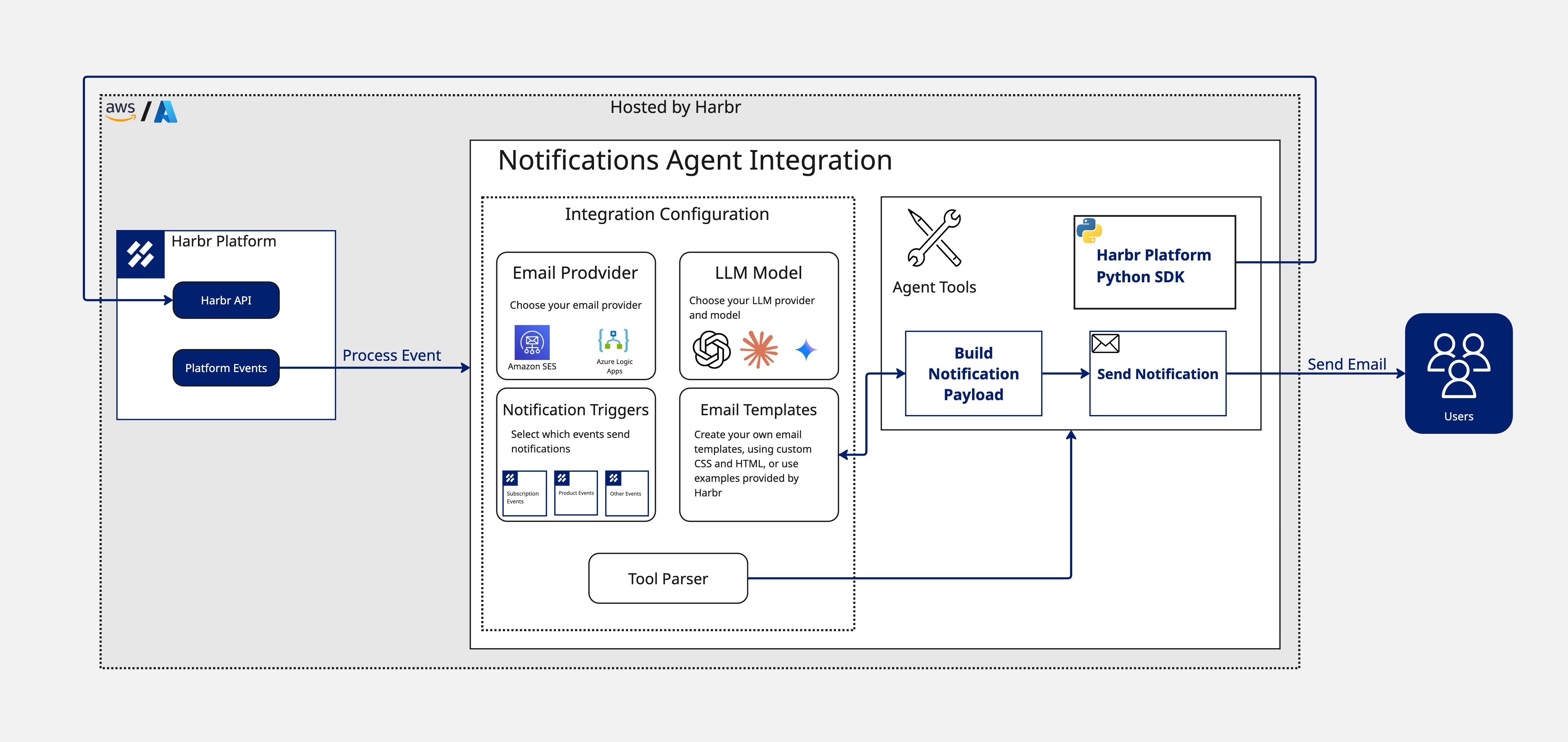
Please see the Operator Docs for a full development flow, supported by a public code repository, clear component explanations, and a build-test-deploy path you can follow or adapt for your use case.
Example Email Notification
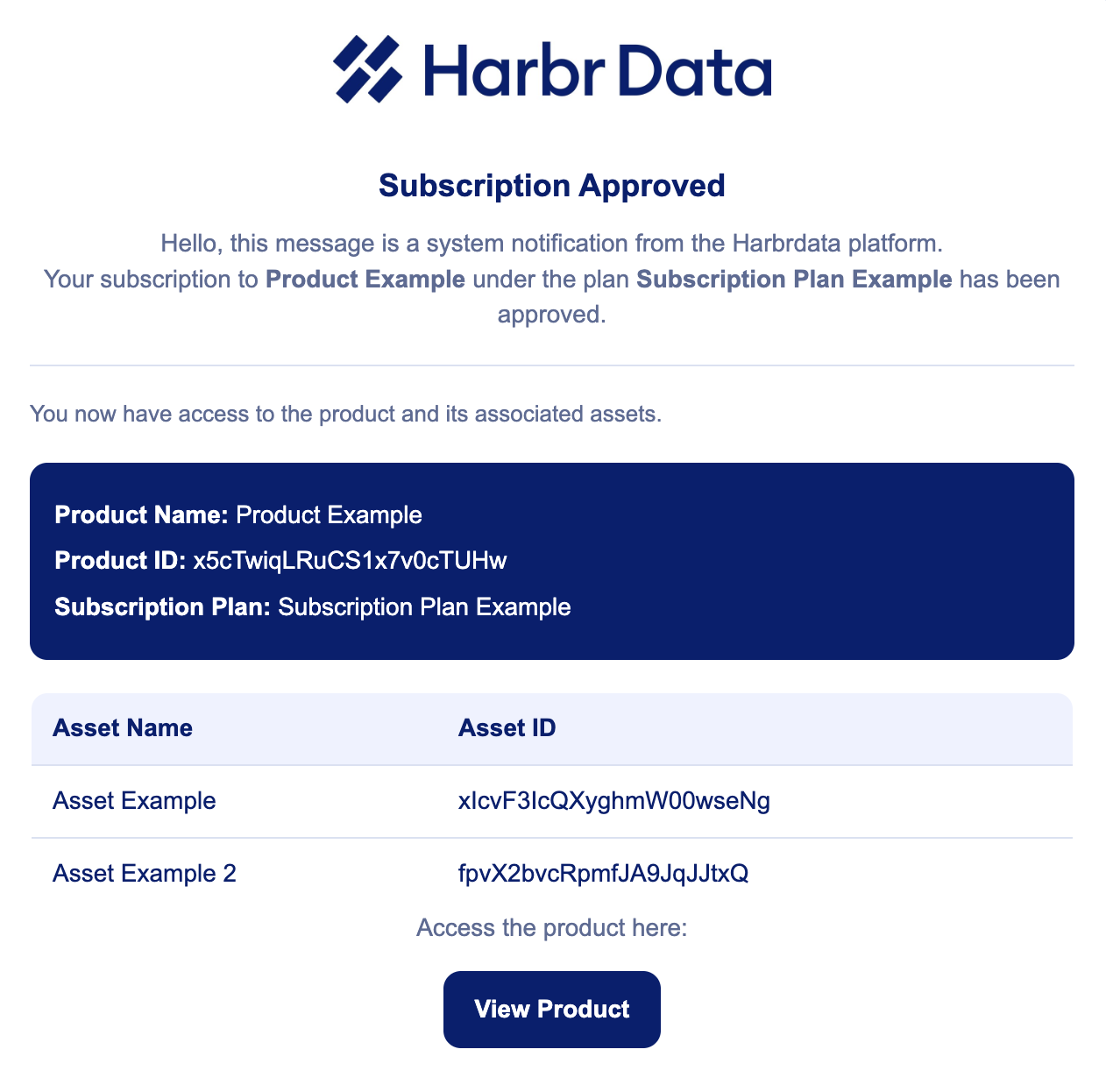
This example of a fully populated email notification that's been enriched so that, in this case, a consumer is informed that their subscription has been approved.
The notification contains the product name, ID and plan type as well as the assets that are within the product to give them a comprehensive overview of what they've subscribed to.
Implementation Workflow
The process of deploying custom notifications follows a structured path from preparation to production.
1. Preparation & Assets
Before implementation, you must gather the following pre-requisites:
Identify Events: Choose the specific triggers you want to monitor to strike the right balance between "knowledge and noise".
Define Audience: Determine who should receive each notification (e.g., Consumer, Producer, or Consumer and Producer).
Branding & Design: Provide brand guidelines, signatures, or custom HTML templates to ensure every touchpoint feels like an extension of your environment.
2. The Trigger
Upon request we will Complete Google Form with all the pre-requisites and once submitted a Jira ticket will automatically be raised.
3. Implementation Flow
The Harbr team and the Notification Agent will then:
Review: Harbr Support verifies triggers and templates.
Configure: Define notifications service and register event triggers.
Run Custom Logic: Enrich data payloads with specific details like Product IDs and Assets.
Build, Test & Deploy: Finalize the service for production.
4. Production
Once live, users will receive Real-time Enriched Emails based on your configured platform activities.